 Bloom: Illustrated Journal
How to start a journal entry: 25 first lines for a blank page
How to start a journal entry: write down one small, concrete thing from today, such as the weather, a sound, something you ate or one person you saw. The first line only has to get the second one written, so it should be easy, specific and a little boring. Below are 25 first lines you can borrow tonight.
In short
- Start with something you noticed, not something you felt. Feelings follow.
- Pick a first line from the list below and finish the sentence. Stop after a few lines if you want.
- Nouns beat adjectives: “leek soup” is easier to write and nicer to reread than “a good day”.
- A prompt is an offer. If something else is on your mind, write that instead.
Why the first line is the hard part
You have the notebook or the app open. You have time. And the page asks a question too big to answer: how was today? A whole day does not fit in a sentence, so nothing gets written.
A five-star App Store review of Rosebud, an app that calls itself “the world’s best AI journal”, put it plainly:
“I always struggled with what to write.”
That reviewer says Rosebud’s prompts are what helped, and plenty of apps lean on the same idea. Day One’s free Basic plan includes a daily prompt, a prompt library and journal templates. Gratitude offers “prompts and gentle reminders for the days you don’t know where to start”. You do not need any app to use the trick, though. A first line that is already half written works on paper too.
Diary or journal, the blank page is the same, and so is the fix.
How to start a journal entry: 25 first lines
Copy one, finish it, and keep going only if you feel like it. They are grouped so you can pick by the kind of day you had.
The weather and the light
- Outside the window today it was…
- The light this morning looked like…
- I got caught in, or just missed,…
- The first time I went outside today, the air…
Sounds
- The loudest thing I heard today was…
- The song stuck in my head is…
- Right now, I can hear…
- Someone said something today I keep thinking about:…
Food and drink
- Today I ate…
- The best thing I tasted today was…
- I made, or someone made me,…
- My first cup of the day was…
One person
- The person I talked to most today was…
- Someone made my day a little easier when…
- I want to remember what [name] said about…
- A stranger I noticed today was…
Time and place
- At three o’clock today I was…
- The place I spent most of today smelled like…
- On the way home I passed…
- The last thing I did before sitting down to write was…
Honest starts for flat days
- Not much happened today, except…
- I am tired, and the reason is…
- Today was mostly…
- One thing that went better than I expected:…
- Tomorrow I would like to…
If you are writing on the first page of a new notebook, do not wait for a grand opening. The date, then one of the lines above. A first page that looks like every other page is a good sign.
Want a longer list for gratitude in particular? Gratitude prompts work the same way: one small question about today.
Write small and concrete
Knowing how to start a journal entry is half of it. Once the first line is down, a few habits keep the entry short and worth rereading.
- Name the thing. “It rained” becomes “cold rain on the window all afternoon”. You will remember the specific version in a year.
- Three sentences is a full entry. Something that happened, something you noticed, something you did. You can stop there and still have a real page.
- Leave the big questions for another day. If you want to work through something heavy, you can. But the everyday entry does not have to sum up your life.
- Skip the catch-up. If you missed yesterday, start with today. A missed day is a rest day, not a debt. There is more on that in how to keep a journaling habit without the guilt.
Here is what that looks like in practice. This is the example entry on the Bloom home page:
“Cold rain on the window all afternoon. I made leek soup with too much pepper and the whole kitchen fogged up. Read two chapters by the lamp and did not check my phone once.”
It starts with the weather, moves to food, and ends on something small the writer was quietly pleased about. Three sentences, nothing dramatic, and it reads well months later.
If you have started and stopped before, read how to start journaling when you have tried before and stopped.
What happens after you write it in Bloom
Bloom: Illustrated Journal is a journaling app where a few lines about your day become a painting, yours to keep. When you open a new entry, a prompt is waiting if you want one. Or ignore it and just write. As the site puts it, “Even a few words become a painting.”
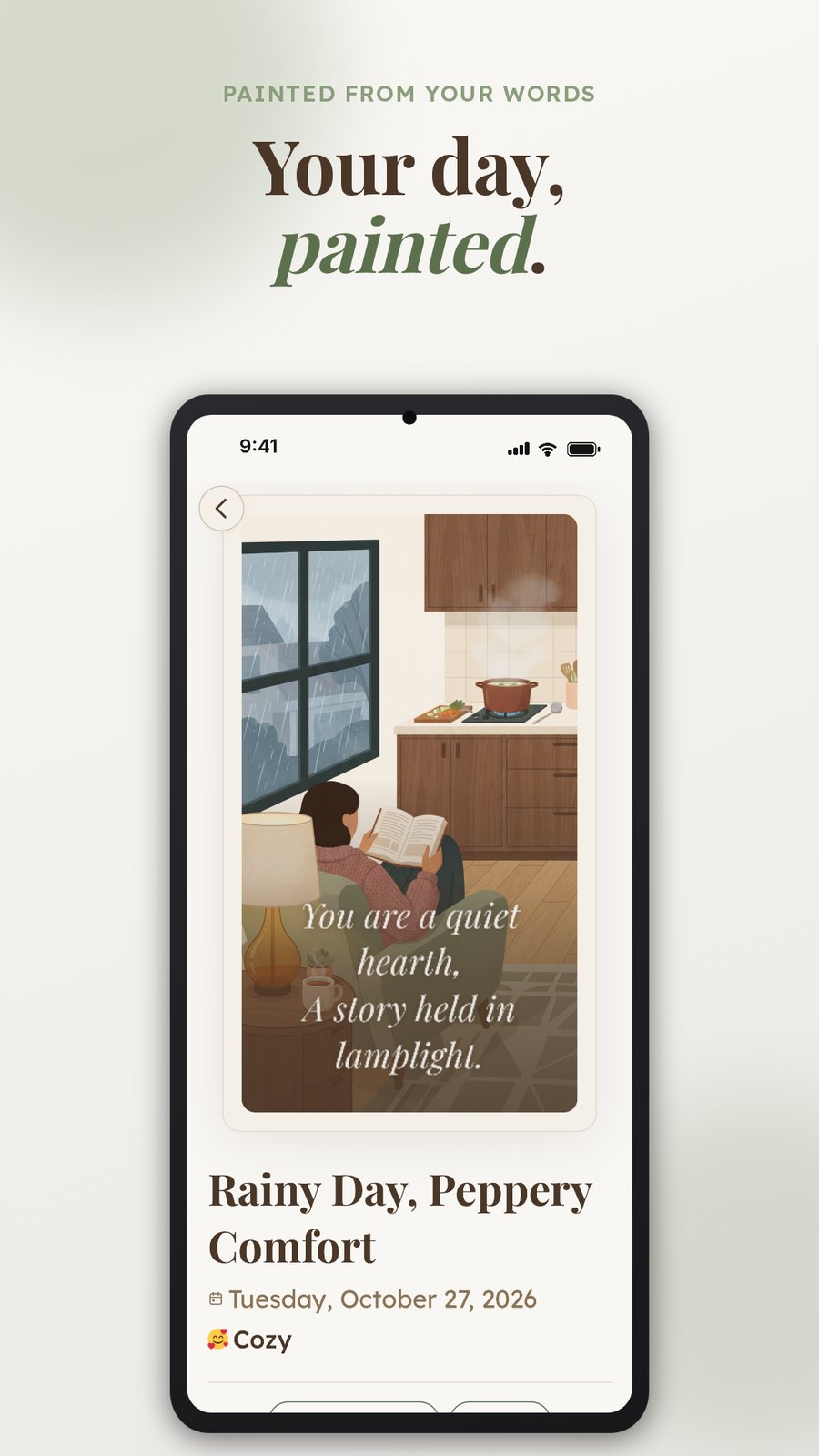
That rainy-day entry came back as a painting titled “Rainy Day, Peppery Comfort”. While a painting is made, a breathing circle paces your breath and Bloom types your own words back to you. Then it arrives with a whispered line laid over it and a title, and a mood read from what you wrote. Each painting is kept in a calendar gallery by month. If you miss a day, one of two automatic rest days a month covers it.
The style is one painting per entry, made from what you actually wrote. If you want to compare it with other apps that add pictures to entries, see journaling apps that turn your words into art.
You do not need an email or a name to start: Bloom opens a private guest journal. Writing, saving, reading back and exporting your journal are free, with a daily mood and a week of insights. Paintings are not free: they come with Bloom Pro, which starts with a 7-day trial, then EUR 9 a month or EUR 49 a year, charged in your store’s local currency. Your journal lives on your phone by default. To paint an entry, its text is sent to Google Gemini; the rest of what happens to your words is written down in the Privacy Policy. Bloom is on Google Play for Android; the iPhone app is on its way to the App Store.
A moment today keeps your garden in bloom.

On Android now. The iPhone version is on its way to the App Store.
Questions
What is a good journaling app for beginners who hate a blank page?
Pick one that offers a prompt but lets you skip it. Day One’s free plan has a daily prompt and a prompt library. Gratitude offers hundreds of prompts and gentle reminders. Rosebud calls itself an AI journal, and the reviewer quoted above credits its prompts. Bloom offers a prompt you can ignore and turns a few lines into a painting (paintings come with Bloom Pro). A paper notebook with the 25 lines above on its inside cover works too.
Is there a visual diary app that makes a picture of each day?
Yes, a few. Some let you decorate entries with photos and stickers, and some generate an image from what you wrote. In Bloom, each entry becomes one painting with its own title, kept in a monthly gallery.
Which journaling apps are free for writing?
Day One’s Basic plan is free with unlimited entries. In Bloom, writing, saving, export, a daily mood and a week of insights are free; paintings need Bloom Pro. Free tiers change, so check each app’s plan page before you start.
Which journaling apps let me take a break without losing my streak?
It depends on the app. On paper there is no streak to lose. In Bloom, two missed days a month are covered automatically, and Rest mode pauses the streak for holidays. Other apps handle missed days differently, so check before you start. We compared the rules in journal apps that let you take a break.