 Bloom: Illustrated Journal
A journal app with no streak pressure: which ones let you take a break?

A few journaling apps let you take a break without losing your streak: Timehop+ has a streak pause, Stoic and Mindsera let you switch the streak off, Day One, Rosebud and Stoic let you repair a broken one, and Bloom: Illustrated Journal covers two missed days a month on its own and has a Rest mode for holidays. If you want a journal app with no streak pressure, the missed-day rule matters more than the streak itself, so check it before you start.
In short: a journal app with no streak pressure
- There are four kinds of forgiveness: pause (stop the count), hide (stop seeing it), repair (fill in the missed day afterwards) and rest days (a missed day is covered without you doing anything).
- None of the journaling app pages we read mentions a streak freeze of the kind language apps use.
- Repair works, but it asks you to do something after the gap. Rest days and pauses do not.
- If you are going away, decide what the streak means before you leave, not on day three.
Why streaks help some people and hurt others
A streak is a small, honest reward. For some people the number is the reason they open the app on a tired evening, and that is fine. The trouble starts when the number becomes the point and one missed day takes it to zero. A June 2026 App Store review of a journaling app put it plainly:
“I had 107 days of journaling, got sick, missed 1 day and this app brought my streak down to day 0”
The writer did nothing wrong. They were ill. But a counter that resets tells them the last 107 days no longer count, and that is often the moment people stop. Habit research suggests a single missed day does little harm to a habit; the story you tell yourself about it does more. We cover that in how to keep a journaling habit without the guilt. This page is about the practical side: what each app actually does when you miss a day.
Streak rules, app by app: pause, hide, repair, rest days
Each rule below is read from the app’s own help page or store listing on November 6, 2026, and linked so you can check it. Apps change, so a rule may have moved since. Where a page does not mention a feature, we say so rather than guess.
| App | Miss a day | Pause | Hide or turn off |
|---|---|---|---|
| Day One | Restore by writing entries for the missed days | Not on the guide | Display cannot be hidden; single journals can be left out |
| Rosebud | Adjust entry dates to keep the streak | Not on the help page | Not on the help page |
| Stoic | Restore by finishing an earlier day’s check-in | Not on the help page | Yes, “Show Streak” can be turned off |
| Mindsera | Not stated | Not stated | Yes, in Appearance (iPhone, version 1.59.1) |
| Timehop | Not stated | Yes, for Timehop+ subscribers | Not stated |
| Bloom | Two automatic rest days a month | Yes, Rest mode | Not stated |
Day One. Its journal streaks guide counts consecutive days with entries. Miss one and you can restore the streak by creating entries on the missed days from the Streaks calendar. The guide says the streak display “cannot be hidden from Settings”, but you can turn off “Include in Streaks” for a single journal. Streaks are part of the free Basic plan. Good if you like backfilling a quick line for the day you missed.
Rosebud. The Rosebud streaks page counts every day you complete a morning or evening journal, and says “Don’t worry if you miss a day; you can adjust your entry dates to maintain your streak.” It is a repair rule, and a kindly worded one.
Stoic. Stoic’s help centre says streaks can be restored: open an earlier date and finish that day’s check-in. It is also one of the few apps here where you can switch the streak off: tap the fire icon and turn off “Show Streak”. Since a 2025 update, “any journaling or reflection activity counts”, not only a written entry.
Mindsera. The App Store version history for version 1.59.1 adds “Hide streaks: turn them off in Appearance if you’d rather journal without them”. We did not find a published missed-day rule, and we did not check the Android app.
Timehop. Not a journal, but its pause is the clearest we found. Its help page says Timehop+ subscribers can manage their streak from a Streak Pause screen in Settings, with no fixed limit on how long the pause lasts.
We looked for published streak rules for Daylio, Journey, Gratitude and Reflectly and did not find a help page that states them, so they are not in the table. If you use one of those, the app’s settings screen is the place to check.
What a forgiving streak looks like in Bloom
Bloom is a journaling app where a few lines a day become a painting, with a whispered line laid over it and a title. Its streak is built for exactly that case. Two rest days a month cover missed days automatically, with nothing to tap and nothing to backfill. If you know a gap is coming, a holiday or a hard week, Rest mode pauses the streak while you are away. Rest mode is free and has no time limit, and it is separate from the monthly rest days. As the site puts it, “Nothing here scolds you.”
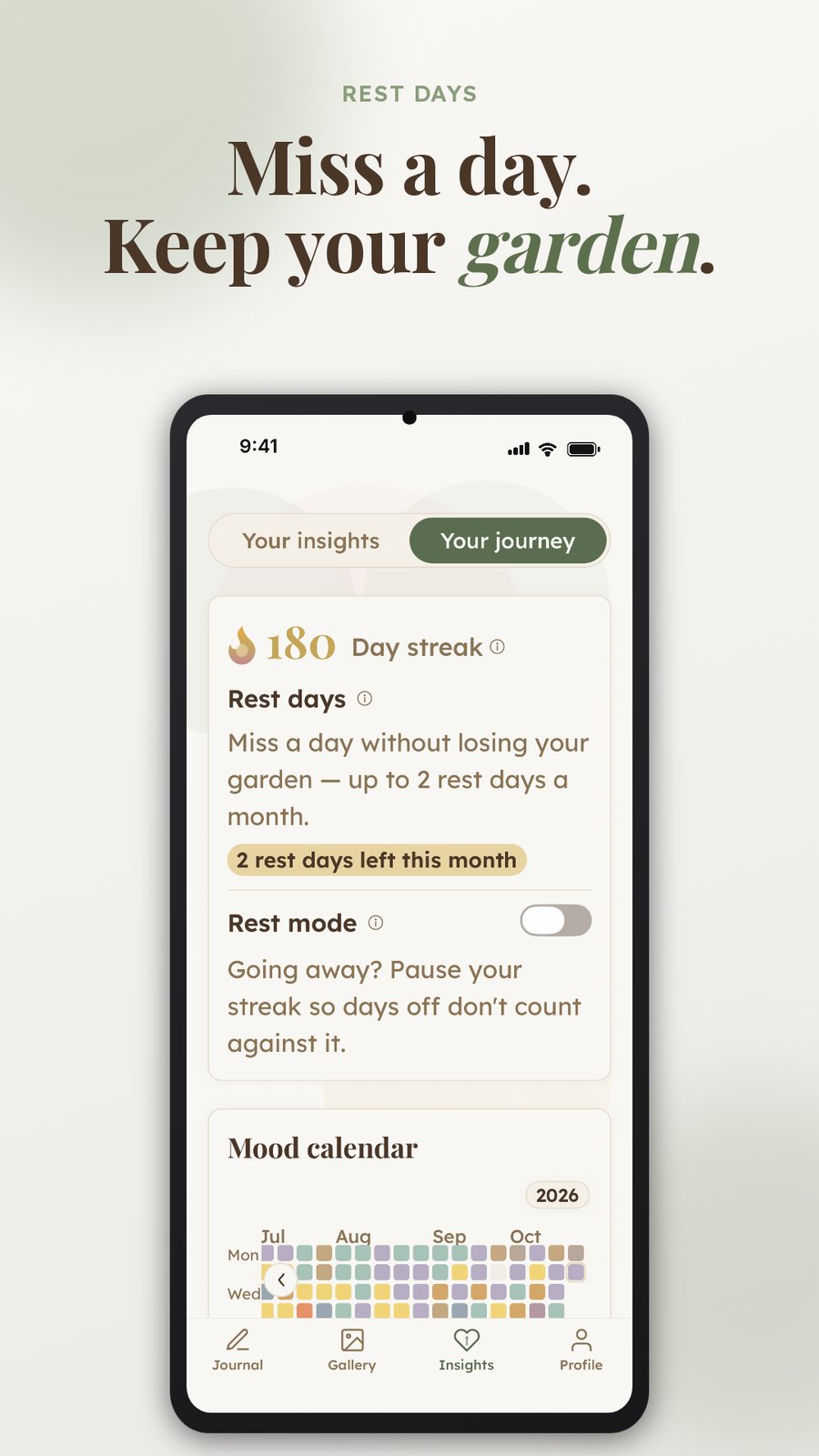
The difference from repair is small but real: you do not have to come back and make up for the day. The gap is simply allowed. Writing, saving, export, a daily mood and a week of insights are free. Paintings are not free: they come with Bloom Pro, which starts with a 7-day trial, then EUR 9 a month or EUR 49 a year, charged in your store’s local currency. Your journal lives on your phone by default; to paint an entry, its text is sent to Google Gemini, as the Privacy Policy explains. Bloom is on Google Play for Android; the iPhone app is on its way to the App Store.
Miss a day without losing your garden.

On Android now. The iPhone version is on its way to the App Store.
If your app has no pause: what to do before a holiday
You do not need to switch apps to take a week off. A few small moves, made before you leave, take most of the pressure out:
- Find the repair rule now. If your app lets you backfill or change entry dates, as Day One, Rosebud and Stoic do, you know the streak can come back. That alone makes the gap easier.
- Or decide not to repair. Catching up on five days at once can turn a calm habit into a debt. Choosing to let the number reset, on purpose, is also a fine answer.
- Hide the number if you can. Stoic and Mindsera let you turn it off. You can switch it back on later.
- Turn off streak reminders. A “don’t lose your streak” notification on a beach is the opposite of the point.
- Keep a one-line option. One sentence on the last night away is a full entry. So is a line in a paper notebook you copy in later, or not.
When you next compare apps, add the missed-day rule to your list next to price and privacy. More questions to ask are in how to choose a journaling app.
Questions
Which journaling apps let me take a break without losing my streak?
Bloom covers two missed days a month automatically and has a Rest mode that pauses the streak. Day One, Rosebud and Stoic let you restore a streak after a gap by filling in or re-dating entries. Timehop+ has a pause, though Timehop is not a journal. Rules change, so check the app’s own help page.
Is there a journaling app with a streak that does not make me feel guilty?
Look for one of two things: a streak you can hide, or a streak that allows gaps. Stoic and Mindsera let you turn the streak off. Bloom keeps the streak but builds in rest days and a Rest mode. As its site puts it, “Nothing here scolds you.”
What is the best gratitude journal app for someone who keeps quitting?
The one whose missed-day rule you can live with. If a reset to zero has made you quit before, pick an app with rest days, a pause, or a streak you can hide, and keep entries short. Three lines on a tired day still count.