 Bloom: Illustrated Journal
Day One alternatives in 2026: pick by why you are leaving
The right Day One alternative depends on why you are leaving: for price, look at Gratitude; for a journal that leaves a painting of each day, look at Bloom: Illustrated Journal; for every platform under one account, look at Journey. And if the issue is only Gold, Day One’s free Basic plan still keeps unlimited entries and end-to-end encryption, so for some people the answer is to downgrade rather than move.
In short
- Price: Gratitude Pro is $39.99 a year, and its free plan covers a daily gratitude habit.
- AI you did not ask for: Day One’s AI tools sit in Gold only, so Basic or Silver may already be the fix.
- A keepsake: Bloom turns a few lines into a painting, with a whispered line laid over it and a title.
- Platforms: Journey runs on Android, iOS, Mac, Windows, the web and Chrome OS.
- Whatever you choose, export your Day One journal first. It is free on every plan.
What changed at Day One in 2026 (and what we could not confirm)
Today Day One has three plans: Basic at $0, Silver at $49.99 a year and Gold at $74.99 a year (as of November 2026). Gold is where the AI lives: Daily Chat, reflective summaries and prompts, title suggestions and image generation.
The rest of the story comes from App Store reviews, not from Day One. Reviews this year describe an account moved from Silver to Gold without asking, AI features that moved up a tier after people had paid for them, and a price rise for long-time subscribers. One reviewer in Canada, a user since 2018, wrote in June:
“they’ve more than doubled the subscription price and canceled my subscription with no notice”
The same reviewer put it at $25 a year before and $70 after; those are their figures. We found no Day One announcement that dates the change or explains it, so treat the timeline as what users report, not as a confirmed fact.
Why people look for an alternative
It is worth being fair first. Day One has the most App Store ratings of the apps in this article, with about 118,900 ratings in the US averaging 4.83, and 4.6 on Google Play. People who leave usually still like it. In the reviews we read, the reasons fall into three groups:
- Price. A yearly plan that grew, or a tier change that felt like a price rise.
- AI. Chat buttons and AI prompts where a quiet page used to be.
- Change itself. Redesigns that move familiar things around in an app that holds years of someone’s life.
Knowing which one is yours narrows the choice fast. The wider checklist is in how to choose a journaling app.
Day One alternatives by reason: price, AI, keepsake, platforms
Prices are US dollars from each app’s own site, read on November 6, 2026, except Bloom, which lists euros. Store prices vary by country and can change.
If it is the price: Gratitude
Gratitude is the closest match for people who used Day One mostly for gratitude prompts. Its free plan includes the journal, prompts, reminders and a photo per entry, with no account needed, and Pro is $39.99 a year. Its October 2026 update added saving a day as a PDF, free for everyone. It is a gratitude app, not a life archive: if you rely on Day One for travel, photos and long entries, it will feel small.
If it is the AI: check your Day One plan first
Day One’s pricing page lists Daily Chat, AI summaries, title suggestions and image generation under Gold only. If the AI is what bothers you, Basic or Silver may give you the quiet page back without moving years of entries. If you do move, read what each app sends away before you start. Bloom has no chat at all: it paints, it does not talk back. But it is not an app without AI. To paint an entry, its text is sent to Google’s Gemini, and the Privacy Policy says so in plain words. The five checks in how private is a journaling app, really? work for any app on this list.
If you want something to keep: Bloom
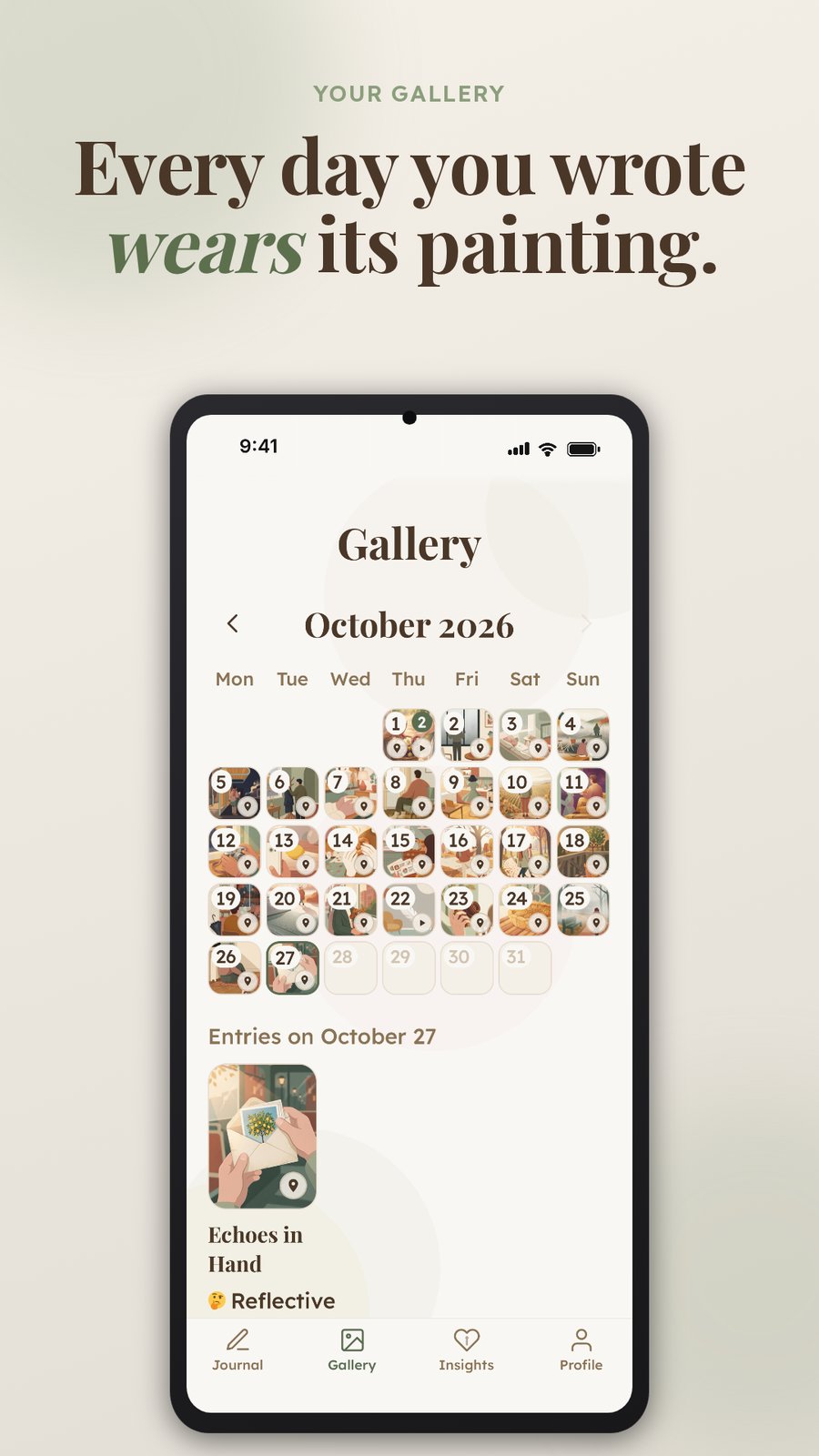
Bloom is a journal where a few lines about your day become one painting, with a whispered line laid over it and a title, yours to keep. A month of entries fills a calendar gallery of paintings rather than a list of text. A prompt is waiting if you want one. Miss a day and one of two automatic rest days a month covers it; Rest mode pauses the streak for a holiday. Writing is free; paintings come with Bloom Pro. More on this family of apps is in journaling apps that turn your words into art.
If it is platforms: Journey
Journey runs on Android, iOS, Mac, Windows, the web and Chrome OS, offers end-to-end encryption, and lets you chat with Journey on WhatsApp and save the conversation as entries. It added a companion called Pal in October 2026, so it is not the place to escape AI chat. Journey keeps its own Day One comparison, which says sync is free; parts of it look dated, since it says Day One has no Windows app and Day One’s site now lists one. We could not confirm Journey’s current price.
What you lose when you leave Day One
Be honest with yourself about this part, because Day One does a lot.
- End-to-end encryption on every plan. Journey offers it too. Bloom does not: your journal lives on your phone by default and cloud storage is a choice, and entry text is stored encrypted, but our policy says plainly that this is not end-to-end.
- Every device. Silver syncs across iPhone, iPad, Mac, Windows and the web. Bloom is a phone app, on Android today with the iPhone app on its way to the App Store.
- Photos, video and audio. Up to 30 photos and videos per entry on Silver, plus audio recording and transcription.
- Printed books and integrations. Day One discounts printed journals and connects to Strava, Zapier and IFTTT.
If those are the reasons you chose Day One, a cheaper plan inside Day One may serve you better than a new app.
Moving your entries: export first
Before you cancel anything, export. Day One offers PDF and a CSV or JSON data export on every plan, including free Basic, and its pricing page says cancelling a paid plan returns you to the free version with your entries intact. Keep that file somewhere you control. Bloom does not import from Day One: it can only import its own export file. Gratitude does not mention a Day One import on its home page either. Plan to keep the old journal as an archive and start the new one fresh. Bloom’s own export is free on any plan, one ZIP with every word and painting, so you are never locked in the other way either.
Try Bloom

On Android now. The iPhone version is on its way to the App Store.
Questions
What are the best alternatives to Day One?
It depends on why you are leaving. Gratitude suits a simpler, cheaper gratitude habit. Journey suits people who need Windows, the web or Chrome OS alongside their phone. Bloom suits people who want each entry to leave a painting to keep. If only Gold bothers you, Day One’s free Basic plan is still an option.
Is there a free Day One alternative?
Gratitude has a free plan with prompts, reminders and a photo per entry. In Bloom, writing, saving, export, a daily mood and a week of insights are free; paintings need Bloom Pro. Day One Basic itself is free, with unlimited entries.
Is there a good Day One alternative for Android?
Day One is on Android too. Journey and Gratitude both have Android apps, and Bloom is on Google Play today. Bloom is also available in German, Spanish, French, Portuguese and Romanian.
Will I lose my Day One entries if I cancel?
According to Day One’s pricing page, no: you return to the free plan and keep your entries, subject to free-plan limits. Export anyway before you switch.